This free Vastu software runs in your browser, with nothing to install and no sign-up. It includes two tools we use ourselves every day: a 16-zone finder that turns a compass reading into a Vastu zone, corrected to true north, and a 32-pada entrance calculator that tells you which classical entrance position your door falls on. Both are built on the same method we use on site, and both say plainly what is measurement and what is traditional guidance.
The tools are a self-check, not a consultation. They help you understand your own home, compare flats before you buy, or prepare readings for an online assessment. When something matters, such as a purchase or a renovation, a measured reading of the whole property is still the right next step.
New: to lay the full 16-zone wheel, the 3×3 grid and the 32 entrances over your own floor plan, use our free Vastu Chakra Tool. Upload a plan, mark the plot, set north and download the marked plan.
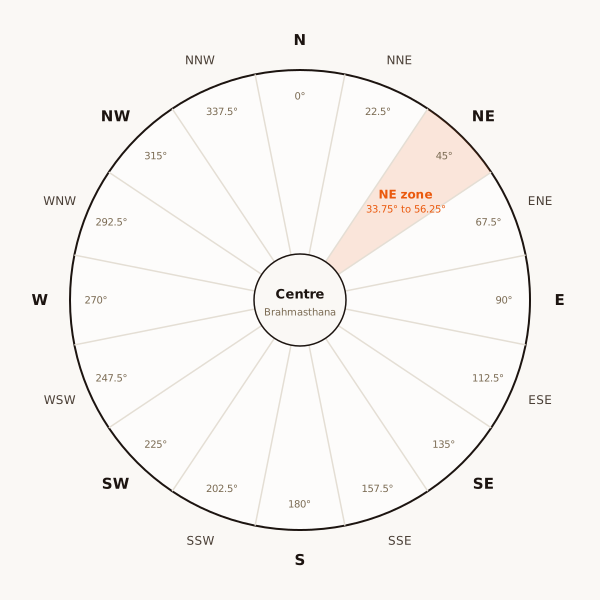
Tool 1: the 16-zone finder
Enter the compass reading of the direction you want to check, and your local magnetic declination. The tool corrects the reading to true north and tells you which of the 16 zones it falls in, with the traditional guidance for that zone.
Where to find your declination: look up your location in the NOAA magnetic declination calculator. East declination is a positive number and west declination a negative one. If you are unsure, leave it at zero; for most of India the difference is small, but near a zone boundary it can change the answer.
How to take a good compass reading
- Use a calibrated phone compass or a simple magnetic compass.
- Stand away from steel doors, grilles, cars, electrical panels and large appliances.
- Hold the phone flat and level.
- To read a room or a door, stand at the centre of the home and point towards it.
- Take two or three readings from slightly different spots and use the average.
Our guide on how to check direction for Vastu explains each step in detail.
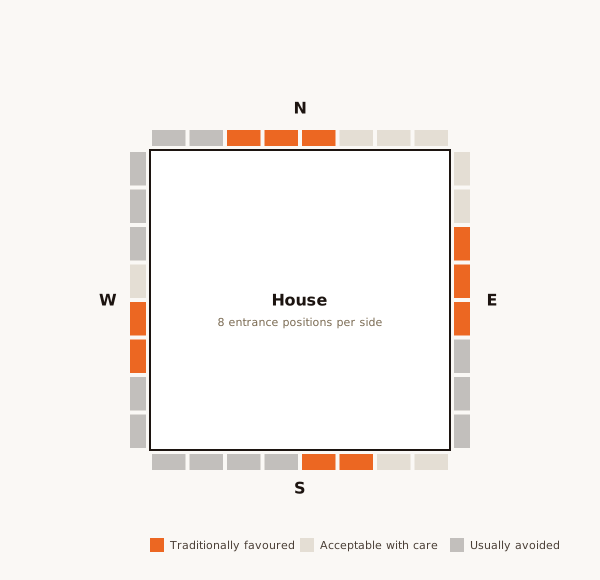
Tool 2: the 32-pada entrance calculator
Choose the wall your door is on, enter the full length of that wall and the distance from the starting corner to the centre of the door. The tool tells you which of the eight padas on that side the door falls on, its traditional name, and whether it is among the commonly favoured positions.
Counting runs clockwise from a fixed corner on each side: on the east wall from the north-east corner, on the south wall from the south-east corner, on the west wall from the south-west corner, and on the north wall from the north-west corner. The tool shows the right corner for the wall you choose.
What the results mean
Each result has two parts. The first is measured: the corrected bearing and the zone, or the pada number. The second is traditional guidance: what the classical texts and common practice say about that zone or pada. We keep these apart on purpose. A measurement is a fact about your home. Traditional guidance is a rule from the tradition, and practitioners sometimes differ on it.
Neither part predicts events. We make no promises about health, wealth or relationships, and nor do these tools.
Common mistakes these tools help you avoid
- Trusting the brochure north arrow, which is often approximate.
- Reading magnetic north as if it were true north.
- Judging a door by the facing alone, when the pada matters more.
- Taking a single reading next to a steel grille.
- Reading a room from its own corner instead of from the centre of the home.
Using the tools before you buy
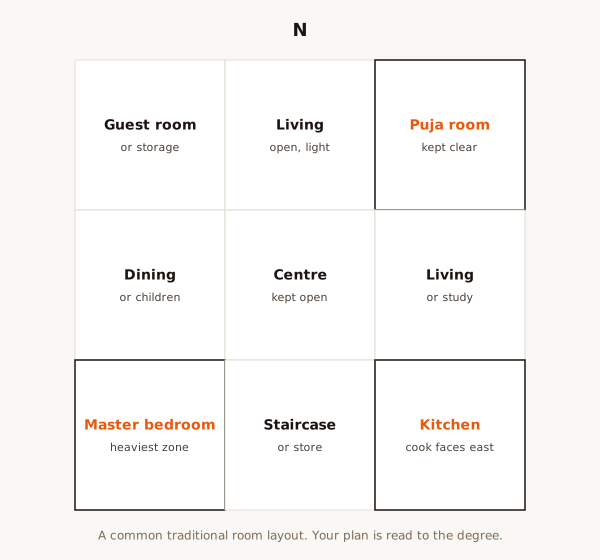
When you visit a flat or plot, take readings at the centre, check the zone of the kitchen, master bedroom and toilets, and run the entrance through the pada calculator. Note the answers with photographs. It takes ten minutes and gives you a sound first picture. Our apartment buying checklist and pre-purchase Vastu check take it further.
Using the tools for an online consultation
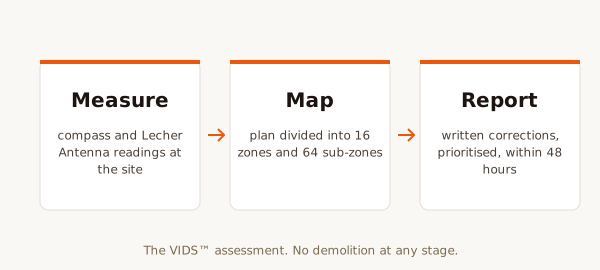
If you book an online Vastu consultation, the readings you take with these tools are exactly what we need, along with your floor plan and photographs. Online assessments use traditional Vastu: the 16-zone map and a 3×3 grid drawn on your plan from guided readings. We confirm every reading with you on a call before drawing the zones.
What the tools cannot do
They cannot see your floor plan, so they cannot find the centre of your home for you, read cut or extended corners, or weigh one finding against another. They also do not cover geopathic stress, which we assess only on site and describe honestly as radiesthesia, not accepted by mainstream science. For a full reading, see our methodology.
Privacy
The tools run entirely in your browser. Nothing you enter is sent to us or stored anywhere. Close the page and the numbers are gone.
More free resources
Alongside the tools, our Knowledge Centre has free guides on Vastu terms, the five elements, kitchen direction, toilet direction and many more topics. When you are ready for a full reading, book a consultation and receive a written report within 48 hours.
A worked example with the zone finder
Say you stand at the centre of a flat and point your phone at the kitchen. The compass reads 128 degrees. You look up your location and find a small westward declination of about one degree, so you enter minus one. The tool returns a true bearing of 127 degrees, which falls in the South-East zone, the fire zone, and tells you this is the classical first choice for a kitchen.
Now point at the master bedroom. Suppose the reading is 205 degrees. The true bearing is 204, which is South of South-West, a zone widely accepted for toilets and storage. Tradition prefers the master bedroom a little further round, in the South-West itself. That is useful to know, but it is not a reason to worry: a bed placed against the south or west wall of that room still follows the guidance well.
These numbers are illustrations, not readings of any real home. Your own readings will differ.
A worked example with the pada calculator
Say your main door is on the south wall of a flat, and that wall is 32 feet long. Measuring from the south-east corner, the centre of the door is 10 feet along. Each pada is 4 feet wide, so 10 feet falls in the third pada, Vitatha, which is one of the two south padas commonly treated as favourable.
If the door centre had been at 17 feet, it would fall in the fifth pada, Yama, which is not among the commonly favoured positions. In that case, see what our guide on the main door and entrance suggests before thinking about any change.
Why we built these tools
Many people come to us after reading conflicting advice online, often based on the facing alone or on magnetic north. The two most useful corrections we can give anyone are to measure from true north and to read the door by its pada. These tools put both corrections in your hands. They also make online consultations faster, because the readings you send are already in the right form.
We will add more tools over time. If there is a calculation you would find useful, tell us when you get in touch.
Frequently asked questions about the tools
Does the zone finder work for offices and factories? Yes. Stand at the centre of the floor or building and read each direction the same way.
What if my wall is not straight or has a bay? Use the length of the main wall line. Bays and projections are read separately in a full assessment.
Is there a phone app? Not at present. The tools work on any phone browser.
How this free Vastu software fits a Vastu consultation
Think of the free Vastu software as the first step of a Vastu reading. The zone finder gives you the direction of each room; the pada calculator gives you the classical position of each door. A Vastu consultation then adds what software cannot: the measured outline of the home, its centre, cut and extended corners, the slope of a plot, how each room is actually used, and a ranked list of corrections without demolition.
Many clients use the tools first, then send us their readings with the plan. That makes the Vastu assessment faster and the written report sharper. See Vastu consultation fees for the options, from an online assessment at ₹5,000 to a full site visit.
Nearby areas we cover.
Frequently asked questions.
Is this Vastu software really free?
Yes. It runs in your browser with no install, no sign-up and no charge.
Do the tools store my readings?
No. Everything is calculated on your device and nothing is sent or saved.
Can these tools replace a consultation?
No. They are a self-check. A full reading also looks at the floor plan, the centre, cut corners and room use.
Do I need to know my magnetic declination?
It helps near zone boundaries. You can look it up in the NOAA calculator; otherwise leave it at zero.
Have a property here you want assessed?
Share the property type and a floor plan on WhatsApp for an exact quote and the next available date.